Clean up a scanned PDF
Gray paper, lighting gradients, coffee stains: scans carry all of it. Clean scan makes the paper pure white (#FFFFFF, not almost-white) and keeps the ink crisp. It was built for sheet music, and it works on any scan.
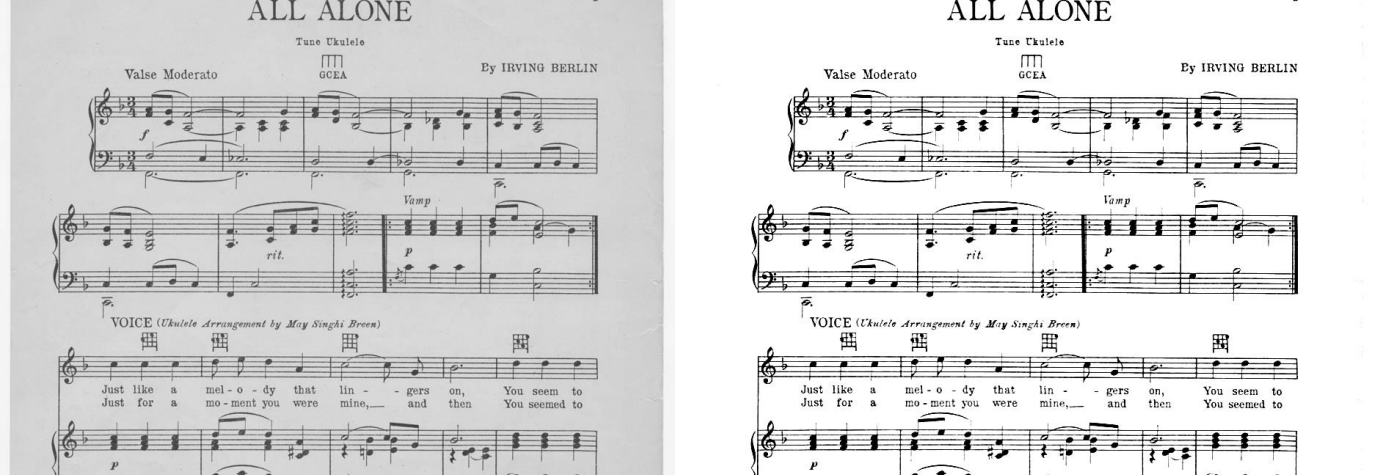
"All Alone" (Irving Berlin, 1924), a public domain scan. Left: the original. Right: after Clean scan. One click, under a second per page.
What it does
Each page is analyzed for its background: the paper tone, the lighting across the page, any stains. That background is divided out, then the levels are remapped so paper lands on exactly white while the ink keeps its anti-aliased edges. No thresholding artifacts, no thinned-out staff lines.
- Uneven lighting and gradients disappear, because the correction is per-region, not one global threshold.
- Stains and aged paper go white with the rest of the background.
- Notation, text, and line art stay sharp. Pure black and white output is one switch away when you want the smallest files.
Do it online
- Open pdfblah.com and drop in your scan. It gets a scan badge.
- Click "Clean it up". The workbench notices the scan and offers the edit. (Or add it yourself: + Add an edit → Clean scan.)
- Check the After view. Flip Before/After to compare. Use strong for dark or stained pages, gentle if the scan is already close.
- Download. One clean multi-page PDF, sized for print or a tablet reader like forScore.
Make it a right-click on your Mac
One command installs a Finder Quick Action called Clean Scan. It sets up the pdfblah CLI too, and everything runs on your machine.
curl -fsSL https://pdfblah.com/clean-scan-mac.sh | shThen select any number of PDFs in Finder, right-click, and choose
Quick Actions → Clean Scan. Cleaned copies land in
~/Downloads/cleaned as name-clean.pdf, and the folder opens when
the batch finishes. Prefer to build it yourself? In Automator, create a Quick Action that
receives PDF files in Finder and add a Run Shell Script action (input as arguments) with
pdfblah clean "$@" -o ~/Downloads/cleaned.
Batches, from the command line
A folder of scans takes one command. A 10-page PDF cleans in a few seconds.
pip install "pdfblah[app]"

# one file
pdfblah clean scan.pdf clean.pdf

# a whole batch: one cleaned PDF per input, into cleaned/
pdfblah clean *.pdf -o cleaned/

# dark or stained pages
pdfblah clean scan.pdf clean.pdf --strength strong

# pure 1-bit black and white (smallest files)
pdfblah clean scan.pdf clean.pdf --bilevel
The tool is open source (MIT) and runs fully on your machine, so nothing is uploaded. See the pdfblah project on GitHub.
Tips
- Output pages are re-rendered images at your chosen dpi (default 300). Scans have no real text layer anyway; run
pdfblah ocrafterwards if you want searchable text. - A dark strip at the page edge is usually the physical edge of the paper in the scan. It is real content, so it stays. Stack a Crop edit in front to trim it.
--dpi 600for print masters,--dpi 150for small files to read on a tablet.