Guide
True text editing vs visual PDF editors: which do you need?
There are two very different ways to change the words in a PDF. One rewrites the exact text and touches nothing else. The other rebuilds the whole page so you can edit it like a canvas. Neither is "better", they solve different problems. Here is how each works and how to pick.
Two ways to change the words in a PDF
Every PDF text tool falls into one of two camps, and the split explains almost everything about how they behave.
Precise pdfblah
Find and replace on the real text
- Find the exact text where it lives, in the page's content stream.
- Rewrite just that string, matching the original font and alignment.
- Save. Every other byte is still your original file.
Visual Stirling PDF, most online editors
Edit on a canvas, then rebuild
- Convert the whole page into editable text and image boxes.
- You edit visually: type, drag, resize, add or delete anything.
- Regenerate a brand-new PDF from those boxes.
What visual editors are genuinely great at
Rebuilding the page is not a flaw, it is the whole point. It buys you things a find-and-replace tool simply cannot do:
- You can see what you are doing. Move a paragraph, resize a heading, swap a logo, nudge a box. It is a canvas, not a rule.
- It can edit a scan. With OCR, a visual editor can read the text off an image-only PDF and let you change it. A find-and-replace tool has nothing to find in a scan, so it cannot help there at all.
- It is forgiving on simple documents. A letter, an essay, a one-column report: rebuild it, move things around, export. Great fit.
Stirling PDF's Text Editor is a good example. It is free, open source, does OCR, and lets you edit text and images right in the browser. If your job is "reshape this document" or "make this scan editable", that is exactly the right kind of tool.
What precise find-and-replace is great at
pdfblah never reinterprets the page. It edits the bytes that hold your text and leaves the rest exactly as the original author wrote it. That gives you a different set of guarantees:
- Surgical. Only the text you matched changes. Layout, fonts, other text, and metadata stay byte-for-byte identical to your original.
- Non-destructive. No re-rendering, no reflow, no font substitution. Nothing you did not ask for moves.
- Provable. Because the rest of the file is untouched, you can show that nothing else changed. That matters for invoices, contracts, and statements.
- Scriptable. Run the same change across five hundred files from one command.
- It refuses rather than wrecks. If a font cannot be edited safely, pdfblah stops and tells you, instead of quietly mangling it.
See the difference
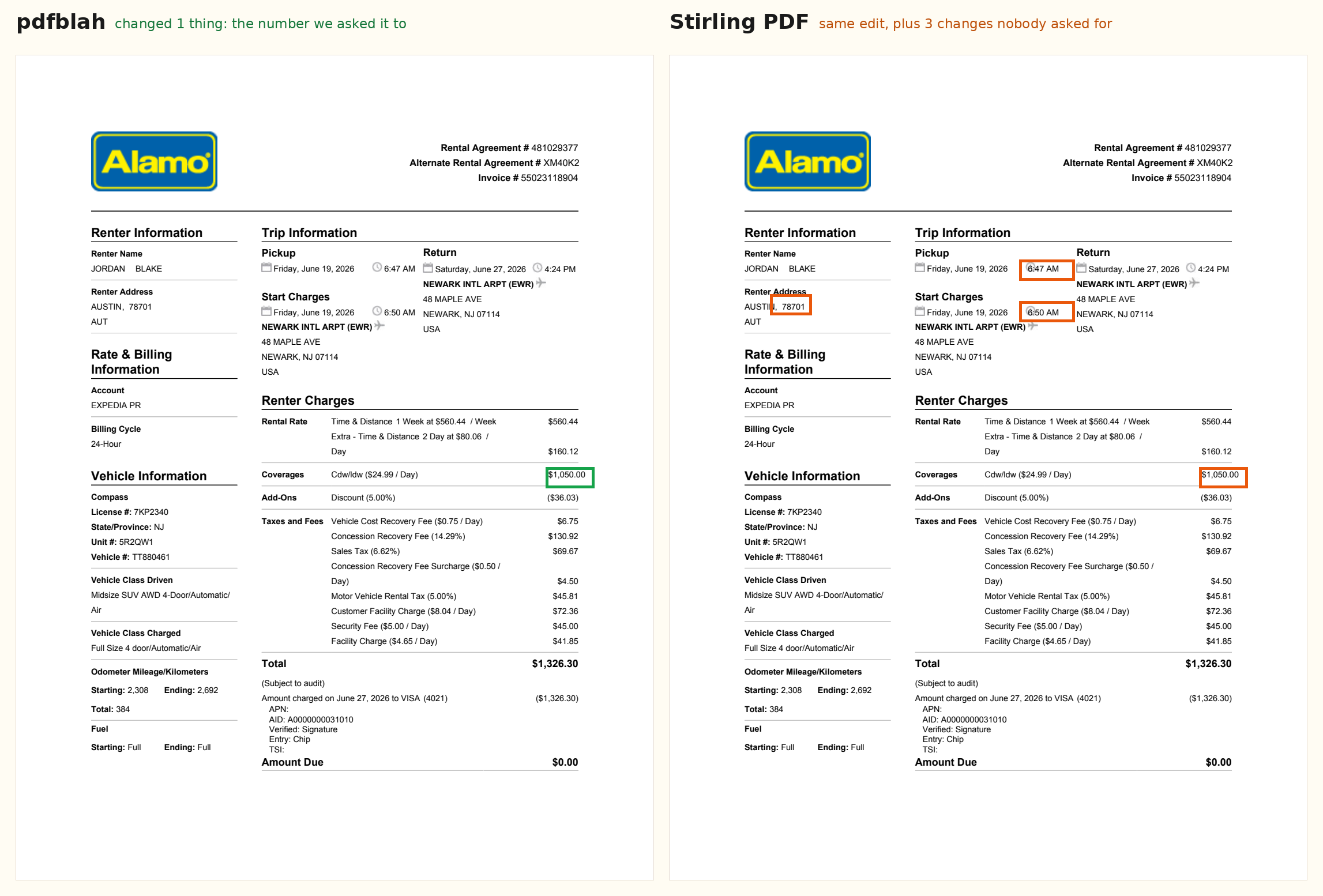
We changed one number on a car-rental invoice, $224.91 to $1,050.00, two ways, then compared the exported files.
That is the tradeoff in one picture. Rebuilding the page is what lets a visual editor be a canvas, but it also means the page gets re-laid-out, and things you did not touch can move.
Even when the rebuild looks fine
We ran the same test on a payslip, and this time the visual editor's output looked almost identical, with only a few right-aligned amounts drifting a couple of points. So the honest takeaway is not "visual editors wreck your document", because on clean, simple pages they usually do not.
Why this happens
A visual editor has to interpret the entire page to make it editable, so when it saves, it regenerates the entire page from that interpretation. Anything the interpretation got slightly wrong, a tab stop, a font metric, a table column, comes out slightly wrong. The more structured the page (tables, multiple columns, tight alignment), the more there is to get wrong. That is why Stirling PDF's own editor warns that it is "not ideal for tables or multi-column layouts". pdfblah sidesteps the problem by never reinterpreting the page: it edits the operators that hold your text and leaves everything else precisely as it was.
Which should you use?
| Your PDF is a scan or image only | Visual editor + OCR |
| You want to redesign, move things, or swap images | Visual editor |
| A simple letter you are heavily rewriting | Visual editor |
| Change specific text and keep everything else identical | pdfblah |
| Invoices, contracts, statements, legal documents | pdfblah |
| The same edit across many files | pdfblah |
| Tables and tight multi-column layouts | pdfblah |
They are not really rivals, they are different tools. Reach for a visual editor when you are reshaping a document or rescuing a scan. Reach for pdfblah when the document is already right and you just need a few words to be different, provably, without disturbing anything else.
Try a precise edit →